The AI Assistant That Broke the Internet
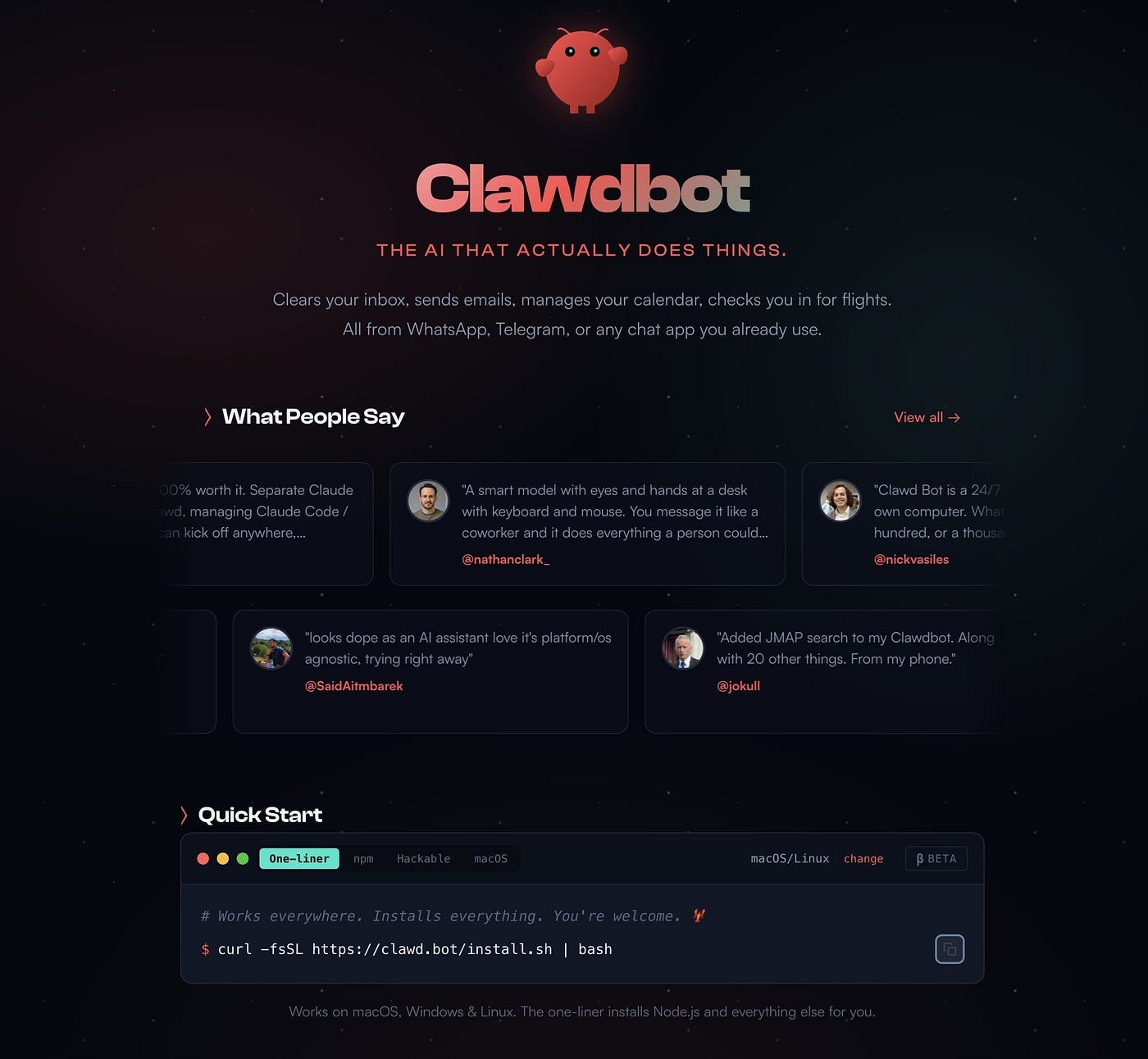
In just a matter of weeks, a personal AI assistant project has taken the tech world by storm, rocketing to over 60,000 GitHub stars and becoming one of the fastest-growing open-source projects in history. Originally launched as Clawdbot, the project recently rebranded to Moltbot following a trademark request from Anthropic. But what makes this AI assistant so special that it has tech enthusiasts, developers, and even AI researcher Andrej Karpathy singing its praises?
The answer is simple yet revolutionary: Moltbot doesn't just chat—it actually does things.
What Is Moltbot?
Moltbot is a self-hosted, open-source personal AI assistant that runs entirely on your own computer or server. Unlike traditional AI chatbots that live in a browser tab and lose context when you close them, Moltbot is designed to be your persistent, always-on digital companion.
Think of it as "Claude with hands"—an AI agent that can:
- Manage your inbox - Sort, unsubscribe, draft replies, and organize thousands of emails
- Control your calendar - Schedule meetings, check conflicts, send reminders
- Automate tasks - Run shell commands, execute scripts, manage files
- Browse the web - Research topics, fill forms, extract data
- Integrate with apps - Connect to WhatsApp, Telegram, Discord, Slack, Signal, iMessage, Gmail, GitHub, and 50+ other services
- Remember everything - Maintain persistent memory across all conversations and sessions
Created by Peter Steinberger (founder of PSPDFKit), Moltbot represents what many see as the next evolution of AI assistants—agents that don't just respond, but proactively help you get work done.
Why Did Clawdbot/Moltbot Go Viral?
Several factors contributed to Moltbot's explosive growth:
1. It Actually Works
While many AI projects promise automation, Moltbot delivers on it. Users shared real demonstrations of the assistant:
- Booking flights autonomously
- Managing entire email workflows
- Creating websites from a phone
- Unsubscribing from thousands of emails
- Checking in for flights automatically
- Building custom skills on-the-fly
The testimonials speak for themselves. One user described it as generating the same excitement as first experiencing ChatGPT. Another said it made them feel like they were "living in the future."
2. Persistent Memory & Proactive Behavior
Unlike standard AI assistants that reset after each session, Moltbot maintains context indefinitely. It learns your preferences, remembers past conversations, and can even send you morning briefings or alerts without being asked. This 24/7 availability and proactive approach feels genuinely revolutionary.
3. True System Access
Moltbot can execute real actions on your computer—run terminal commands, write and execute scripts, control your browser, commit code to GitHub, and even program new capabilities for itself. It's the difference between an AI that tells you how to do something and one that actually does it for you.
4. Self-Hosted & Privacy-Focused
In an era of data concerns, Moltbot runs entirely on your hardware. Your conversations, preferences, and sensitive data never leave your machine unless you explicitly configure it to do so. This privacy-first approach resonated strongly with tech-savvy users.
5. Open Source & Hackable
The project is completely open source, allowing users to modify, extend, and customize it. The community has created dozens of "skills" (extensions) that add new capabilities—from Spotify control to smart home integration to custom meditation generators.
6. Viral Social Proof
The project spread organically through demo videos, screenshots, and enthusiastic testimonials on X (formerly Twitter). High-profile endorsements from figures like Andrej Karpathy, investor Chamath Palihapitiya, and tech publications like MacStories created a snowball effect.
As one analysis noted, the virality was driven by FOMO (fear of missing out)—everyone wanted to experience this glimpse of the AI-powered future.
The Name Change: From Clawdbot to Moltbot
On January 27, 2026, the project underwent a dramatic rebrand. Anthropic, the company behind Claude AI (which powers many Moltbot installations), sent a cease-and-desist letter citing trademark concerns with the "Clawd" name.
Peter Steinberger agreed to change the name, choosing "Moltbot" as a fitting alternative—inspired by how lobsters molt their shells to grow. The mascot, previously a space lobster named Clawd, became Molty.
However, the transition wasn't smooth. During the approximately 10-second gap between releasing the old social media handles and claiming new ones, crypto scammers hijacked both the @clawdbot GitHub organization and X account. They immediately began promoting fraudulent cryptocurrency tokens to tens of thousands of followers. The fake tokens briefly reached market capitalizations in the millions before collapsing after Steinberger publicly warned they were scams.
Despite the chaos, the software itself remained unchanged. Clawdbot and Moltbot are identical—same code, same functionality, just a new name.
How Moltbot Works
Moltbot operates on a sophisticated architecture:
Model Agnostic
You choose which AI model powers your assistant. While optimized for Anthropic's Claude 3.5 Sonnet (and now Claude Opus 4.5), you can also use:
- OpenAI's GPT-4o
- Local models for maximum privacy
- Other compatible AI APIs
Multi-Platform Communication
Interact with your assistant through your preferred messaging apps:
- Telegram
- Discord
- Slack
- Signal
- iMessage
Skills System
Moltbot uses a plugin architecture called "skills" that extend its capabilities. Users can:
- Install community-created skills
- Ask Moltbot to build new skills for specific tasks
- Modify existing skills to customize behavior
Persistent Context
Everything is stored locally as actual files on your hardware, meaning:
- Conversation history is preserved indefinitely
- Preferences are remembered across sessions
- Context builds over time, making the assistant more helpful
Real-World Use Cases
Users have shared impressive examples of what they've accomplished:
Productivity Automation:
- Processing thousands of emails in minutes
- Automated calendar management with conflict detection
- Daily briefings delivered proactively each morning
- Flight check-in automation
Development Work:
- Managing Claude Code/Codex sessions remotely
- Autonomous bug fixing and PR creation
- Code reviews and testing automation
- Building entire websites from a phone
Personal Tasks:
- Insurance claim submissions
- Finding doctor appointments
- Health reimbursement processing
- Smart home control (air purifiers, lighting)
Creative Applications:
- Custom meditation generation with TTS and ambient audio
- Website creation on-the-fly
- Content pipeline automation
The Security Concerns
With great power comes significant responsibility. Security researchers have raised serious concerns about Moltbot:
1. Prompt Injection Vulnerabilities
Because Moltbot reads emails, documents, and messages, malicious actors could embed hidden instructions that trick the AI into executing harmful commands. Researchers demonstrated that a carefully crafted email could make Moltbot forward sensitive credentials to an attacker.
2. Exposed Instances
Hundreds of Moltbot admin panels were found exposed on the public internet due to improper configuration. These exposed instances revealed API keys, conversation histories, and full system access.
3. Credential Storage
The assistant often stores sensitive tokens and credentials in plain text, making them vulnerable to common credential-harvesting malware.
4. Supply Chain Risks
Community-created "skills" could contain malicious code. Since Moltbot trusts these plugins, a compromised skill could execute arbitrary commands.
5. Automation Risks
The speed at which Moltbot can execute actions means small errors can have large consequences—deleting thousands of emails or files in seconds with no easy undo.
Google's VP of Security warned: "Don't run Clawdbot" on systems with sensitive data without proper isolation and security measures.
Best Practices for Safe Use
If you want to experiment with Moltbot, experts recommend:
- Run it on a dedicated machine - Use a separate computer, virtual machine, or cloud server, not your primary work device
- Implement proper sandboxing - Limit file system access and command execution capabilities
- Use test accounts - Don't connect real email, calendar, or sensitive services initially
- Enable authentication - Always require authentication for admin panels
- Review permissions carefully - Understand what access you're granting
- Monitor activity - Keep logs and audit what the assistant is doing
- Stay updated - Follow security patches and community warnings
The Broader Impact
Moltbot's viral success represents a significant moment in AI development:
Validation of Agentic AI
The project demonstrates that users want AI systems that execute tasks autonomously, not just provide information. This validates the industry's shift toward "agentic" AI.
Open Source Innovation
Moltbot shows how a single developer with open-source tools can create something that competes with billion-dollar companies' products. As one commentator noted, "A megacorp like Anthropic or OpenAI could not build this."
The Future of Personal AI
The enthusiasm around Moltbot indicates strong demand for AI assistants that:
- Run locally under user control
- Maintain persistent context
- Take real actions
- Integrate seamlessly into existing workflows
Market Influence
The project's success has influenced infrastructure services as users seek secure ways to run local AI agents. Some predict it could "nuke a ton of startups" by offering open-source alternatives to commercial AI tools.
Getting Started with Moltbot
For those interested in trying Moltbot:
Requirements:
A computer that can stay powered on (Mac Mini, Linux VPS, or dedicated server)
Node.js 22 or higher
An API key for your chosen AI model (Claude, GPT-4, or local model)
Installation:
The project offers multiple installation methods:
One-line installer script (easiest)
NPM package installation
Git clone for developers
Companion desktop app for macOS
Cost:
The software is free and open source. You only pay for:
AI model API usage (varies by provider)
Server hosting if using cloud deployment (optional)
The Community
Moltbot has fostered a thriving community:
- Active Discord server with thousands of members
- Growing library of community-created skills
- Regular updates and improvements
- Extensive documentation
- ClawdHub for sharing and discovering skills
What's Next?
The project continues to evolve rapidly with:
- Enhanced security features
- More platform integrations
- Improved skill creation tools
- Better sandboxing options
- Community-driven development
Peter Steinberger remains committed to keeping the project open source and user-controlled, stating the mission remains: "AI that actually does things."
Conclusion
Moltbot (formerly Clawdbot) represents a paradigm shift in how we interact with AI. By combining persistent memory, proactive behavior, real system access, and seamless app integration, it offers a glimpse of what personal AI assistants could become.
However, with this power comes responsibility. The security concerns are real and shouldn't be dismissed. Users must approach Moltbot with appropriate caution, proper configuration, and realistic expectations about the risks.
For those willing to invest the time to set it up safely, Moltbot offers an unprecedented level of AI assistance—one that genuinely feels like having a tireless digital employee working alongside you 24/7.
Whether you're a developer looking to automate your workflow, a productivity enthusiast seeking to reclaim hours from mundane tasks, or simply curious about the cutting edge of personal AI, Moltbot is worth exploring. Just remember: with a lobster this powerful, proper training and containment are essential.
The future of personal AI has arrived, and it's wearing a shell that's constantly molting to grow. Welcome to the age of truly agentic AI assistants.
Resources:
Official Website: https://molt.bot
GitHub Repository: https://github.com/moltbot/moltbot
Documentation: https://docs.molt.bot
Community Discord: https://discord.com/invite/clawd
ClawdHub: https://clawdhub.com
Disclaimer: This article is for informational purposes only. Always review security implications before running AI agents with system-level access. The author and publisher are not responsible for any security incidents or data loss resulting from using Moltbot.